WLED Christmas and Diwali Light Patterns: Red-Green, Candy Cane, Retro Bulbs and Diyas
WLED Christmas light patterns with exact settings: red-green, candy cane, C9 bulbs with gaps, tree lights and Diwali diyas. Presets file to download.
Diwali 2026 falls on Sunday, November 8, a good three weeks before most Christmas lights go up. That’s enough time to build a pattern once, save it, and let a timer do the rest for two holidays.
Every recipe here uses the free WLED web interface and works on WLED 0.14, 0.15 and 16. There are only two tricks behind all of them, so start there. If you’d rather start from finished presets, download them further down.
Other holidays: Halloween, and Hanukkah, Kwanzaa, Lunar New Year, July 4th and more. All of our holiday pages, with both preset files, are on the holiday lights hub.
The two tricks
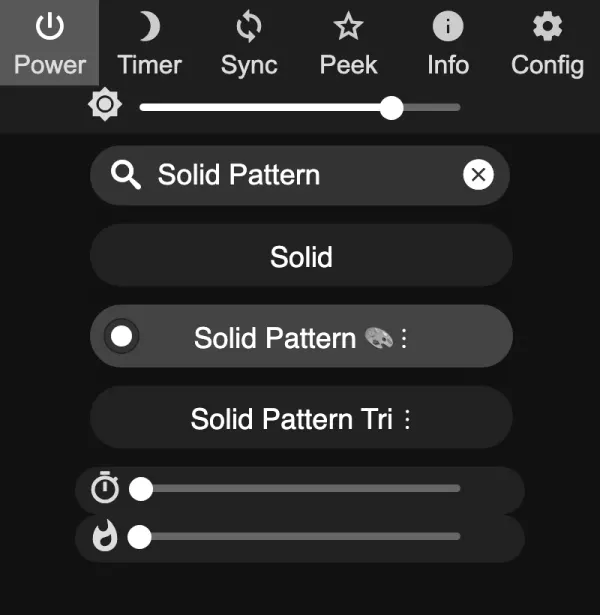
Solid Pattern (effect 83). Color 1 shows for Speed + 1 LEDs, color 2 for Intensity + 1 LEDs, repeating. The web UI calls the sliders “Fg size” and “Bg size”. Exact values like 0 or 1 are hard to hit with a finger, so the JSON API (shown below) is easier.
Staggered segments. For a pattern that repeats every C LEDs, each color run of L LEDs becomes a segment with grouping L and spacing C minus L, and each segment starts where its run starts within the first repeat. Every segment covers the whole strip (Stop = your LED count). Our 2 red 1 white guide walks through the logic step by step.
Two practical limits. Every color run (and every dark run) costs one segment, and ESP8266 builds allow 16 segments, ESP32 builds 32. Also, make dark bulbs a real black segment. On 0.14 and 0.15, LEDs no segment covers can keep an old color.
The examples assume a 150 LED strip, where one LED is one “bulb”. If your strip is dense and you want fatter bulbs, add grouping to the Solid Pattern segment (grouping 3 makes every step 3 LEDs) or multiply all numbers in the segment tables.
Christmas recipes
Alternating red and green
Solid Pattern, color 1 red, color 2 green, Speed 0, Intensity 0:
curl -X POST -H "Content-Type: application/json" \
  -d '{"seg":[{"fx":83,"sx":0,"ix":0,"pal":0,"col":[[255,0,0],[0,255,0]]}]}' \
  http://192.168.1.50/json/state
Speed 0, Intensity 0: one red, one green.
Want red, green, white? Use Solid Pattern Tri, which repeats three colors of equal size. Set color 1 red, color 2 green, color 3 white.
Candy cane effect (2 red, 2 white)
Solid Pattern, red and white, Speed 1, Intensity 1. For a candy cane that moves, use Chase 2 (effect 37) with red as color 1 and white as color 2: hard stripes that run along the strip, with Width setting how wide they are. The Running effect with the same colors and a low Speed is the softer version. Its stripes are waves rather than blocks, but it still reads as a candy cane from the street.
Candy cane: Speed 1, Intensity 1.
2 red, 1 white (short version)
Solid Pattern, red and white, Speed 1, Intensity 0. People ask for this one most, so it has its own guide.
Classic multicolor (red, green, blue, orange, gold)
Five colors repeating, so C = 5, five segments:
| Segment | Start | Stop | Grouping | Spacing | Color (hex) |
|---|---|---|---|---|---|
| 1 | 0 | 150 | 1 | 4 | red FF0000 |
| 2 | 1 | 150 | 1 | 4 | green 00FF00 |
| 3 | 2 | 150 | 1 | 4 | blue 0000FF |
| 4 | 3 | 150 | 1 | 4 | orange FF6000 |
| 5 | 4 | 150 | 1 | 4 | gold FFB400 |
C = 5: one bulb per color, five staggered segments.
All segments use the Solid effect. Orange and gold look better slightly warmer than pure RGB values suggest, which is why FF6000 and FFB400 rather than FFA500.
C9 style bulbs with gaps
The old big-bulb look: each color, then two dark LEDs. Five colors plus five dark runs of 2 makes C = 15 and needs 10 segments (fine on ESP8266 and ESP32):
| Segment | Start | Grouping | Spacing | Color |
|---|---|---|---|---|
| 1 | 0 | 1 | 14 | red |
| 2 | 1 | 2 | 13 | black |
| 3 | 3 | 1 | 14 | green |
| 4 | 4 | 2 | 13 | black |
| 5 | 6 | 1 | 14 | blue |
| 6 | 7 | 2 | 13 | black |
| 7 | 9 | 1 | 14 | orange |
| 8 | 10 | 2 | 13 | black |
| 9 | 12 | 1 | 14 | gold |
| 10 | 13 | 2 | 13 | black |
One full repeat (C = 15): each color, then two dark bulbs.
Stop is 150 for all (150 is a multiple of 15, so the last repeat is complete). WLED also has palettes called C9, C9 2 and C9 New. With an effect that uses the palette, they give a quick retro look without segment work, though without the dark gaps.
Warm white twinkle
Not a pattern, but the most requested Christmas look after red and green: effect Fairytwinkle (or Twinkle), palette * Color 1, color 1 a warm white like FFB45A. On RGBW strips, use the White LED channel for a much nicer warm white than RGB mixing.
Warm white (FFB45A) with Fairytwinkle. On a real strip, some bulbs dim and brighten at random.
Adding motion to a segment pattern
Each segment runs its own effect. Set every segment of a pattern to the same effect and speed, for example Breathe for a slow glow or Fairytwinkle for twinkling, and the pattern stays in place while it animates. Making the whole pattern move along the strip is harder with segments. That is where a palette with hard color stops and the Running effect, or an app, saves time.
Save the result as a preset (it stores all segments).
WLED effects for Christmas
Patterns are only half of it. These effects suit Christmas lights well, and they all work on a single segment with no segment tables. The numbers are starting points; the sliders go from 0 to 255.
| Effect (ID) | Palette or colors | Sliders | What you get |
|---|---|---|---|
| Colortwinkles (74) | Palette Jul (31) | Fade speed 128, Spawn speed 128 | Red and green bulbs fading in and out on a dark strip |
| Twinklefox (80) | Palette C9 (48), color 2 black | Speed 128, Twinkle rate 128 | Old style multicolor bulbs twinkling. Leave Cool unticked and dimming bulbs turn redder, like incandescent ones |
| Fairy (49) | Palette C9 (48) or Jul (31) | Speed 128, # of flashers 128 | A multicolor string with some bulbs flashing. More flashers means more of them blink |
| Fairytwinkle (51) | Palette * Color 1 (2), color 1 FFB45A | 128, 128 | Warm white bulbs that dim and brighten at random |
| Chase 2 (37) | Color 1 red, color 2 white | Speed 100, Width 16 | A moving candy cane with hard stripes. Width 16 makes each stripe 2 LEDs |
| Running (15) | Color 1 red, color 2 white or green | Speed 40, Wave width 128 | Soft stripes rolling along the strip |
| Candle Multi (102) | Color 1 FFB45A | Speed 96, Intensity 224 | Every LED flickers like a candle. Good for windows |
Twinklefox lets a little of color 2 glow behind the twinkles, which is why it should be black here. The C9 palettes (C9, C9 2 and C9 New) are WLED’s take on the colors of big old-fashioned bulbs: red, amber, green and blue.
All seven are in the presets download, set up as described.
WLED Christmas tree lights
How you wrap the tree decides what you can do with it.
Spiral wrap (one strip wound round from the bottom to the top). Every turn is a run of consecutive LEDs, so each tier of the tree is just a segment. Light the strip, find the LED where each turn starts (move a segment’s Stop until the light ends where you want), and make one segment per tier. Effects that move along the strip, like Running, Chase 2 or Rainbow, climb the tree in a spiral without any extra work.
Vertical runs (strands from the top down, like a mega tree). Each strand is a column, so the tree is a grid. In Config›2D Configuration, set Strip or panel to 2D Matrix, the width to the number of strands and the height to the LEDs per strand. Tick Serpentine if the strands go down and back up. The 2D effects then draw across the whole tree. A cone isn’t a rectangle, so the picture gets squeezed toward the top. That’s fine for most effects. If you want exact pixel positions, WLED can load a custom ledmap.json, and if you want shows sequenced to music on a large mega tree, that’s the point where xLights becomes worth learning.
The star on top. Give it its own segment at the end of the strip, keep it on Solid in gold (FFB400) or warm white, and let the rest of the tree animate. The topper then stays steady in every preset that leaves that segment alone.
A tree is seen from a metre away, not from the street. Most people end up well below full brightness indoors, which also keeps the power supply happy.
Diwali recipes
Diwali diyas (warm oil lamp glow)
Diyas are small oil lamps: mostly flame gold, some orange and deep red, with dark between them. Repeat: 2 gold, 1 dark, 1 flame orange, 1 dark, 1 deep red, 1 dark (C = 7, 6 segments):
| Segment | Start | Grouping | Spacing | Color (hex) |
|---|---|---|---|---|
| 1 | 0 | 2 | 5 | gold FFB400 |
| 2 | 2 | 1 | 6 | black |
| 3 | 3 | 1 | 6 | flame orange FF8000 |
| 4 | 4 | 1 | 6 | black |
| 5 | 5 | 1 | 6 | deep red B40000 |
| 6 | 6 | 1 | 6 | black |
Two repeats of the diya pattern (C = 7).
Use Stop 147 on a 150 LED strip (147 = 21 repeats of 7) so the last diya is complete. For a slow flicker, set the colored segments to Breathe at low speed, or try the Candle effect for a lamp-like flicker.
Diwali festive (gold, magenta, orange, green)
Bright and celebratory: four colors, one LED each, C = 4:
| Segment | Start | Grouping | Spacing | Color (hex) |
|---|---|---|---|---|
| 1 | 0 | 1 | 3 | gold FFB400 |
| 2 | 1 | 1 | 3 | magenta FF00C0 |
| 3 | 2 | 1 | 3 | flame orange FF8000 |
| 4 | 3 | 1 | 3 | green 00FF00 |
Diwali festive, C = 4.
For more life, give each segment the same slow Breathe or Fairytwinkle, as in the Christmas section.
Rangoli colors
Rangoli uses many bright colors. The quickest web UI route is a multicolor palette (Rainbow, Party, or a custom palette) with a slow effect. To match a real rangoli, build a custom palette from four or five of its colors in the web UI palette editor. For a palette from a photo of your rangoli, see make a WLED palette from a photo.
A multicolor palette spreads many colors along the strip.
Diwali lights for a balcony or window
A balcony railing or a window frame is a short run, often 1 to 3 metres, so one controller and one segment are enough.
- Railing: run the strip along the top rail and use the diya pattern above. Set Stop to the largest multiple of 7 that fits your LED count (a 2 metre strip at 60 LEDs per metre has 120 LEDs, so Stop 119).
- Window: keep it warm. Candle Multi with color 1 in diya gold (FFB400) looks like a row of lamps from inside and outside. If the strip goes all the way round the frame, split it into four segments (one per side) so you can light only the bottom edge on some nights.
- Indoors near people: brightness around 30 to 40 percent is plenty for a short run, and diya colors look more like flames when they aren’t at full brightness.
Diwali light colors
| Color | Hex | WLED RGB |
|---|---|---|
| Diya gold | FFB400 | 255, 180, 0 |
| Flame orange | FF8000 | 255, 128, 0 |
| Deep red | B40000 | 180, 0, 0 |
| Magenta | FF00C0 | 255, 0, 192 |
| Green | 00FF00 | 0, 255, 0 |
Gold and orange are the lamp flames, and the bright magenta and green come from rangoli and festive decorations. These are LED values: screen colors like FFA500 look yellow on most strips, so the oranges here are deliberately redder.
Five nights of Diwali
Diwali runs over five days, from Dhanteras to Bhai Dooj. In 2026 that’s about November 6 to November 11 (calendars differ by a day, so check yours). Set the timers once:
- WLED 16: a Sunset timer that runs your Diwali preset or playlist, with the date range November 6 to November 11, and a Regular timer at 23:59 with the same range that runs an Off preset.
- WLED 0.14 and 0.15: the sunset slot has no date range there, so use a regular timer at about your local dusk with the November 6 to November 11 range, plus the same 23:59 Off timer.
Pattern Maker templates
If the tables above made your eyes glaze over, this is the shortcut, on iOS and Android. In WLED Max 1.1.4, open a light on the Control tab and tap Make a Pattern, or on the Presets tab tap + and New Pattern.
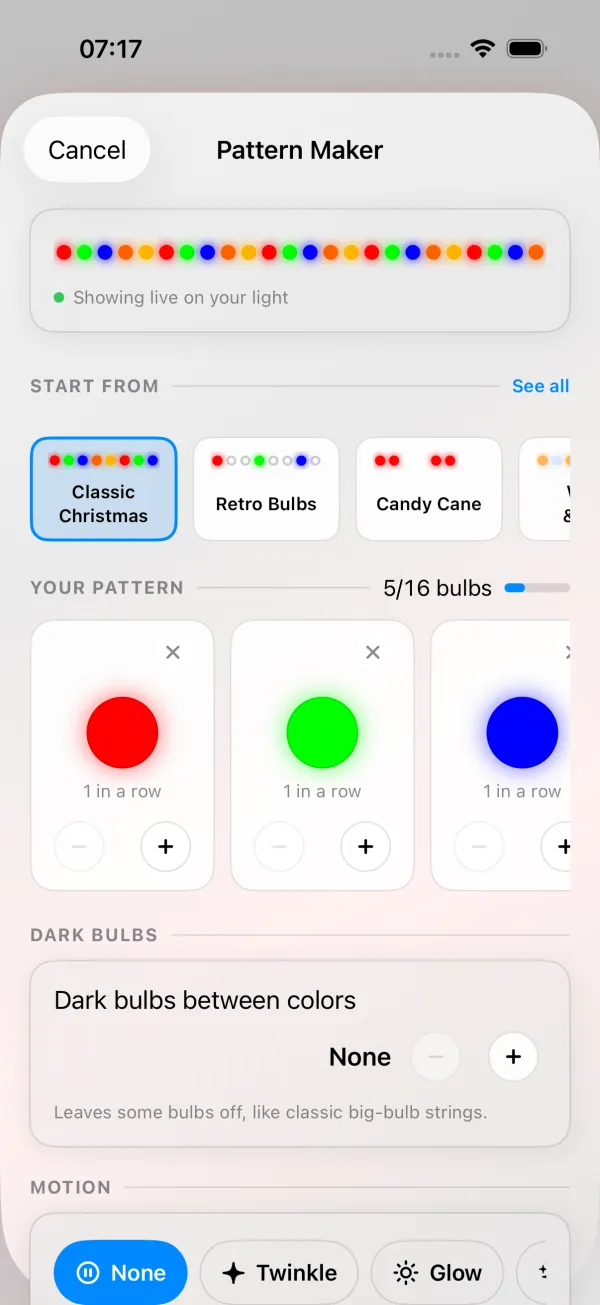
- Under START FROM, pick a template. The row opens on what’s in season: Halloween looks in September and October, Diwali Diyas first from November 1 to 11, Christmas from November 12, New Year’s Eve first from December 26 to January 1, then whatever holiday is coming up. See all shows all 34 templates in six groups.
- Adjust colors and counts (up to 6 colors, each 1 to 10 bulbs) and Dark bulbs between colors (0 to 4). One repeat can be at most 16 bulbs.
- The pattern shows live on your light while you edit. Cancel puts the light back.
- Pick a motion: None, Twinkle, Glow, Sparkle, Wave, Sweep or Chase (moves the whole pattern along the strip), with a Speed slider.
- Choose Whole light or one part of the light, then Save as Preset. Turn on Start with this pattern when the light turns on if it should come back after a power cut or when the outdoor plug switches on.
The result is an ordinary WLED preset (Chase also takes one custom palette slot on the light), a preset you can also run from the web UI, Home Assistant or a timer.
All 34 templates
“Your current choice” means the template only changes the colors and keeps the motion you already picked. Slow, medium and fast are where the Speed slider starts.
Christmas
| Template | Colors per repeat | Dark bulbs | Motion it starts with |
|---|---|---|---|
| Classic Christmas | red, green, blue, orange, gold | 0 | your current choice |
| Retro Bulbs | red, green, blue, orange, gold | 2 after each | your current choice |
| Candy Cane | 2 red, 2 white | 0 | your current choice |
| Red & Green | 2 red, 2 green | 0 | your current choice |
| Red, Green & White | 2 red, 1 white, 2 green, 1 white | 0 | your current choice |
| Icy Blue | 2 cool white, 1 light blue | 0 | Sparkle, slow |
| Red & Gold | 2 red, 2 gold | 0 | Glow, slow |
| Gold & White | 3 warm white, 1 gold | 0 | Twinkle, slow |
Halloween & Fall
| Template | Colors per repeat | Dark bulbs | Motion it starts with |
|---|---|---|---|
| Halloween | 2 orange, 2 purple | 0 | your current choice |
| Spooky | 2 purple, 2 green | 0 | Glow, slow |
| Pumpkin | 3 orange, 1 green | 0 | Twinkle, slow |
| Fall Harvest | orange, gold, deep red | 0 | your current choice |
Holidays (in calendar order)
| Template | Colors per repeat | Dark bulbs | Motion it starts with |
|---|---|---|---|
| New Year’s Eve | 2 gold, 1 cool white | 0 | Sparkle, fast |
| Valentine’s | 2 red, 2 pink | 0 | your current choice |
| Mardi Gras | 2 purple, 2 green, 2 gold | 0 | Sparkle, medium |
| St. Patrick’s | 2 green, 1 white | 0 | your current choice |
| Easter Pastels | pink, light blue, yellow, purple, green | 0 | Glow, slow |
| Viva México | 2 green, 2 white, 2 red | 0 | Wave, slow |
| Fourth of July | 2 red, 2 white, 2 blue | 0 | your current choice |
| Diwali Diyas | 2 gold, 1 flame orange, 1 deep red | 1 after each | Glow, slow |
| Diwali Festive | gold, magenta, flame orange, green | 0 | Sparkle, medium |
| Hanukkah | 2 blue, 1 white | 0 | your current choice |
Sports & Teams
| Template | Colors per repeat | Dark bulbs | Motion it starts with |
|---|---|---|---|
| Blue & Gold | 2 blue, 2 gold | 0 | your current choice |
| Burnt Orange & White | 2 orange, 1 white | 0 | your current choice |
| Maroon & White | 2 deep red, 1 white | 0 | your current choice |
| Blue & Silver | 2 blue, 2 cool white | 0 | your current choice |
| Black & Gold | 2 gold | 2 after each | your current choice |
LEDs can’t show black, silver or maroon, so the team looks use dark bulbs for black, cool white for silver and deep red for maroon.
Celebrations & Causes
| Template | Colors per repeat | Dark bulbs | Motion it starts with |
|---|---|---|---|
| Birthday Party | pink, yellow, light blue, green, purple | 0 | Sparkle, medium |
| Pink & Blue | 2 pink, 2 light blue | 0 | Chase, slow |
| Pink Ribbon | 2 pink, 1 white | 0 | Glow, slow |
| Veterans Green | green | 0 | Glow, slow |
Everyday
| Template | Colors per repeat | Dark bulbs | Motion it starts with |
|---|---|---|---|
| Warm White | warm white | 0 | Twinkle, slow |
| Warm & Cool | warm white, cool white | 0 | your current choice |
| Rainbow | red, orange, yellow, green, blue, purple | 0 | your current choice |
Requirements: WLED 0.14 or newer and a strip with RGB color. Pattern Maker doesn’t show for 2D matrices, white only strips or groups. Chase uses one custom palette slot on the light.
Make it automatic
A pattern that you have to switch on every evening gets old by December 3. Two options that run on the light:
- WLED timers: a sunset timer runs your holiday preset, a regular timer at 23:00 runs an Off preset, both limited to a date range such as November 28 to January 6. (On WLED 0.14 and 0.15 the sunset slot has no date range, so use a regular timer at about dusk for the holiday preset.) Steps in turn WLED on at sunset.
- A playlist: rotate Candy Cane, Classic Christmas and a warm twinkle every 10 minutes, and point the sunset timer at the playlist.
A sunset timer starts the playlist, a 23:00 timer turns it off.
Download these presets
wled-christmas-presets.json is a WLED presets file with the looks from this page:
| Slot | Preset | Effect |
|---|---|---|
| 1 | Candy cane | Solid Pattern, red and white, 2 and 2 |
| 2 | Red and green | Solid Pattern, alternating |
| 3 | Red green white | Solid Pattern Tri |
| 4 | Warm white twinkle | Fairytwinkle |
| 5 | Christmas twinkle | Colortwinkles, Jul palette |
| 6 | C9 twinkle | Twinklefox, C9 palette |
| 7 | Candlelight | Candle Multi, warm white |
| 8 | Moving candy cane | Chase 2 |
| 9 | Christmas show | Playlist of 1, 2, 4, 5, 6 and 8, one minute each |
| 10 | Off | Turns the light off, for timers |
To load it: Config > Security & Updates, Restore presets, pick the file, Upload.
Restoring replaces every preset and playlist on the light. Click Backup presets on the same page first. How to back up and restore.
The presets only change the first segment, and they don’t store start and stop, so they work on any strip length. They don’t change brightness either.
If you want just one or two of them, paste them instead. In the web UI, tap + Preset, untick Use current state, and paste into the API command box:
{"on":true,"seg":[{"id":0,"fx":83,"sx":1,"ix":1,"pal":0,"col":[[255,0,0],[255,255,255],[0,0,0]]}]}That’s the candy cane. The Christmas twinkle:
{"on":true,"seg":[{"id":0,"fx":74,"sx":128,"ix":128,"pal":31}]}And the C9 twinkle:
{"on":true,"seg":[{"id":0,"fx":80,"sx":128,"ix":128,"pal":48,"col":[[255,0,0],[0,0,0],[0,0,0]]}]}You can also send any of them straight to the light with the curl command from the top of the page, to try a look before saving it.
Roofline tips
- Check color order first. If red shows as green, fix Color Order under Config > LED & Hardware (LED Preferences on 0.14 and 0.15) before building anything.
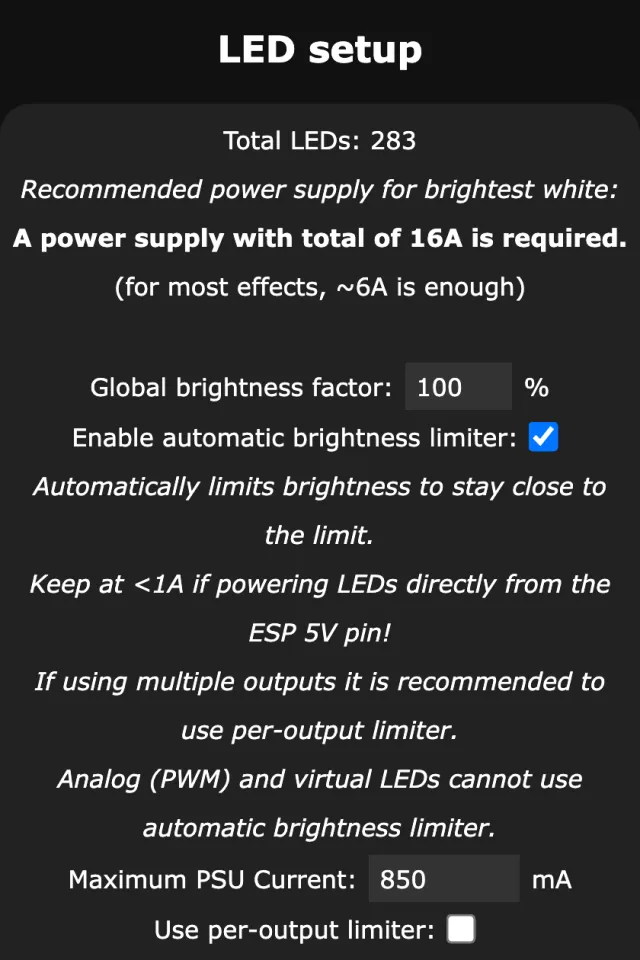
- Set Max Current for your power supply, and inject power on long 5 V runs. Full white candy cane stripes draw a lot. Numbers in WLED settings from your phone.
- Back up your presets once the patterns are done (how). Rebuilding a 10 segment retro pattern next year is no fun.
- Outdoor: use outdoor rated strips and enclosures, and keep the controller where Wi-Fi reaches it.
- Broken bulb at the end of the strip? The strip length isn’t a multiple of the repeat. Set Stop to the nearest multiple (147 for a repeat of 7 on 150 LEDs).
- Two controllers, one pattern: build it on both (or copy presets between them) and trigger both with the same timer or with WLED sync.
People sometimes ask whether they need xLights for this. Not for repeating patterns. xLights is for shows sequenced to music, which is a different (and much bigger) project.
If segments still feel like magic, WLED segments explained goes through start, stop, grouping and spacing one at a time.