WLED 2 Red 1 White Pattern (and Other Repeating Patterns)
Make a 2 red, 1 white pattern on a WLED strip with Solid Pattern (Speed 1, Intensity 0), stacked segments for 3 or more colors, or Pattern Maker in WLED Max.
Written by Jamie Conde, who builds WLED Max at MeowScript. WLED Max is an independent app and is not affiliated with or endorsed by the official WLED project.
Quick answer: for two colors, use WLED’s Solid Pattern effect with red as color 1, white as color 2, Speed at 1 (that’s 2 LEDs of color 1) and Intensity at 0 (1 LED of color 2). Three or more colors, or dark gaps between bulbs? Stack segments over the same LEDs with grouping and spacing. Or use Pattern Maker in WLED Max (new in 1.1.4): tap colors and counts, see it live on the strip, and save it as a preset.
Both web UI methods work on WLED 0.14, 0.15 and 16. Nothing to install.
The goal: red, red, white, over and over along the strip.
Two colors: the Solid Pattern effect
Solid Pattern repeats “X LEDs of color 1, then Y LEDs of color 2” along the segment. In its code, the number of lit LEDs is Speed + 1 and the number of background LEDs is Intensity + 1. So:
| Pattern | Color 1 | Color 2 | Speed | Intensity |
|---|---|---|---|---|
| 2 red, 1 white | red | white | 1 | 0 |
| 1 red, 1 white | red | white | 0 | 0 |
| 3 red, 2 white | red | white | 2 | 1 |
| 2 blue, 1 white (Hanukkah) | blue | white | 1 | 0 |
In the web UI, open Effects, pick the Solid Pattern effect, set the two colors, and set the sliders. The UI names them “Fg size” and “Bg size”.
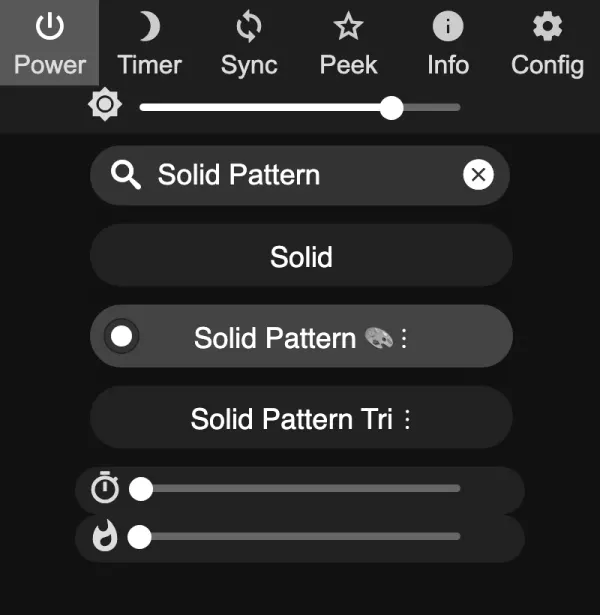
Hitting exactly 1 on a 0 to 255 slider is fiddly with a finger, so the JSON API is easier. Effect 83 is Solid Pattern:
curl -X POST -H "Content-Type: application/json" \
  -d '{"seg":[{"fx":83,"sx":1,"ix":0,"pal":0,"col":[[255,0,0],[255,255,255]]}]}' \
  http://192.168.1.57/json/state
Bigger “bulbs”: if each bulb should be 3 LEDs wide (common on dense strips), set the segment’s Grouping to 3. Every pattern step then covers 3 LEDs.
There’s also Solid Pattern Tri, which repeats three colors, but all three get the same size, so it can’t do 2 red, 1 white.
Three or more colors: stacked segments
This is the flexible way. Each color run becomes its own segment, all covering the strip, each starting a little later:
- Grouping = how many LEDs in a row show the color.
- Spacing = how many LEDs to skip after each group.
- For a pattern that repeats every C LEDs, a run of L LEDs gets grouping L and spacing C minus L.
For 2 red, 1 white on a 150 LED strip (C = 3):
| Segment | Start | Stop | Grouping | Spacing | Effect, color |
|---|---|---|---|---|---|
| 1 | 0 | 150 | 2 | 1 | Solid, red |
| 2 | 2 | 150 | 1 | 2 | Solid, white |
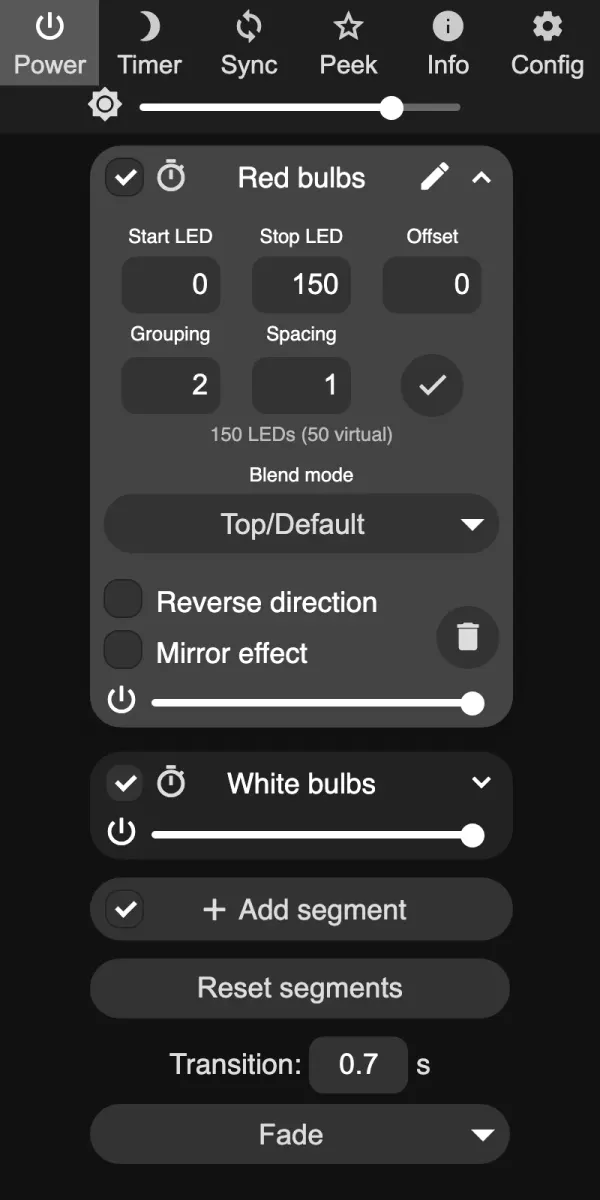
Segment 1 lights LEDs 0 and 1, skips 2, lights 3 and 4, and so on. Segment 2 starts at LED 2, lights it, skips two, lights 5. Together: red, red, white, red, red, white.
Segment 1 (grouping 2, spacing 1), segment 2 (start 2, grouping 1, spacing 2), and what you see with both on.
For Retro bulbs with gaps (1 red, 1 dark, 1 green, 1 dark, C = 4), add the dark runs as their own black segments: red at start 0 (grouping 1, spacing 3), black at 1, green at 2, black at 3, each with grouping 1 and spacing 3. On 0.14 and 0.15, LEDs that no segment covers can keep an old color, so give dark bulbs a real black segment instead of leaving them uncovered.
Two cautions. Don’t use the segment Offset field for this. If the strip length isn’t a multiple of the pattern, the last partial repeat wraps onto the first LEDs. And every run costs one segment: ESP8266 builds allow 16 segments, ESP32 builds 32 (64 on WLED 16 boards with PSRAM, 20 on an ESP32-S2 with 0.15.1 and later 0.15 releases). A five color pattern with gaps is already 10.
Pattern Maker in WLED Max (new in 1.1.4)
On the Control tab, tap Make a Pattern (“Repeat colors like 2 red, 1 white”). It becomes Edit Pattern when a pattern covers the whole light. You can also start from the Presets tab: + then New Pattern. It works the same on iOS and Android.
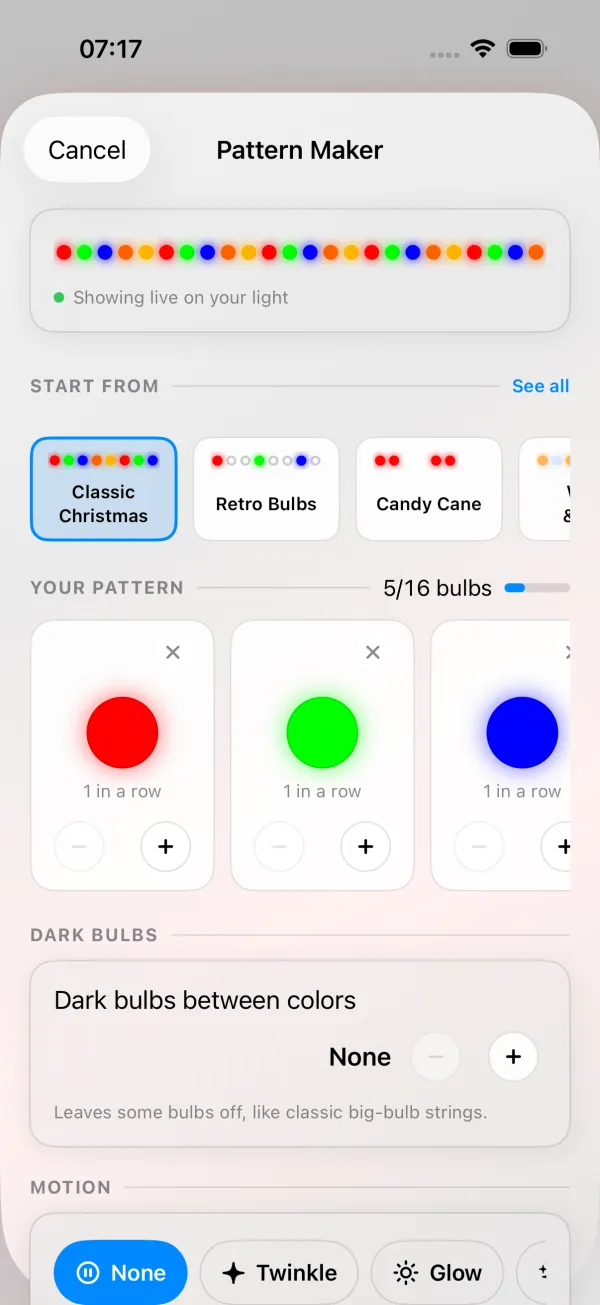
- Start from a template or blank. The START FROM row opens on what’s in season (Halloween in September and October, Diwali Diyas from November 1 to 11, Classic Christmas from November 12, New Year’s Eve from December 26 to January 1), and See all lists all 34 templates in six groups: Christmas, Halloween & Fall, Holidays, Sports & Teams, Celebrations & Causes and Everyday. Close to 2 red, 1 white already: Candy Cane (2 red, 2 white), Hanukkah (2 blue, 1 white), St. Patrick’s (2 green, 1 white), Pink Ribbon (2 pink, 1 white), Burnt Orange & White (2 orange, 1 white) and Maroon & White (2 deep red, 1 white).
- Set colors and counts. Up to 6 colors, each 1 to 10 bulbs in a row. For 2 red, 1 white: red with 2, white with 1. Quick colors: Red, Green, Blue, Orange, Gold, Yellow, White, Warm White, Cool White, Purple, Pink, Deep Red, Light Blue and Teal, or any color from the color wheel.
- Dark bulbs between colors, 0 to 4, “like classic big-bulb strings”.
- Watch it live. The pattern shows on your light while you edit (“Showing live on your light”). Cancel puts the light back the way it was.
- Add motion (optional): None, Twinkle, Glow, Sparkle, Wave, Sweep or Chase, with a Speed slider from Slow to Fast. Chase moves the pattern itself along the strip and adds one custom palette to the light (“Chase adds one palette to your light. Cancel removes it.”).
- Choose where. If your light is split into several parts (segments), pick Whole light or one part.
- Save. Save as Preset puts it in a free preset slot (“Your other presets won’t change”), or tap Use Without Saving. Editing a saved pattern offers Update or Save as New. Turn on Start with this pattern when the light turns on to make it the power-on preset.
One repeat can be at most 16 bulbs (colors plus dark bulbs), and a counter shows how many you’ve used. If you later change the color or effect on a light that’s showing a pattern, the app asks “Replace the pattern?” first, so you don’t wipe it by accident.
Requirements: WLED 0.14 or newer and a strip with RGB color. Pattern Maker doesn’t show for 2D matrices, white only strips or groups.
When the pattern comes out wrong
The pattern starts in the middle of a bulb at the end of the strip. The strip length isn’t a multiple of the pattern length. Shorten the segment so it is (150 LEDs fits a repeat of 3 exactly), or accept a partial repeat at the end.
Red shows as green. Wrong color order. Fix the color order (GRB vs RGB) under Config > LED & Hardware in the web UI (LED Preferences on WLED 0.14 and 0.15) before building patterns.
The last colors never show up, or the app says “This light can’t fit a pattern this detailed.” The light ran out of segments. The web UI greys out Add segment once you hit the limit, and a preset or API call that asks for more just skips the extras without an error. Use fewer colors or fewer dark bulbs. ESP8266 lights hit this sooner.
White looks blue next to red. RGB white is cold. Try Warm White, or lower brightness a little.
The pattern drifts or jumps. An effect other than Solid is running on one of the segments, or a playlist is switching presets. Set every segment back to Solid, or check your playlists.
FAQ
How do I make a candy cane pattern in WLED? Solid Pattern with red and white, Speed 1, Intensity 1 (2 and 2). In WLED Max, pick the Candy Cane template.
Can I animate a repeating pattern? Yes. In the web UI, run a moving effect on each segment or use a palette with Running. Pattern Maker’s motions do it in one tap.
Does this work on a 2D matrix? Solid Pattern does, but it treats the matrix as one long line. Pattern Maker is for strips only.
For whole holiday looks (candy cane, retro C9 bulbs, diyas) with exact numbers, see the Christmas and Diwali patterns guide. If segments are new to you, WLED segments explained covers grouping and spacing in more depth, and presets and the power-on preset shows how to make a pattern the first thing the light shows.