WLED Stuck in Realtime Mode? How Take Control Works
WLED ignoring your app while E1.31, Art-Net, DDP, Hyperion or LedFx sends data? Find the sender, override it with the JSON API, or stop it.
Quick answer: something on your network is streaming live pixel data to the light (E1.31, Art-Net, DDP, UDP realtime, TPM2.NET, Hyperion or similar), and live data always wins. Stop the sender, or wait out the timeout (2.5 seconds by default). To override it, send {"lor":1} to the JSON API for “until the data stops”, or {"lor":2} for “until the next reboot”. In WLED Max, that’s the Take Control button on the banner, on iOS and Android.
You tap an effect, nothing happens. You drag the color wheel, the light flickers for a frame and goes back. It feels broken, but WLED is doing exactly what it was told.
Two ways of drawing pixels
Normally WLED runs its own effects. In realtime mode another program sends the exact color of every LED, many times a second, and WLED just shows it. Screen sync (Hyperion, HyperHDR), music visualizers (LedFx) and lighting consoles (E1.31 or Art-Net from QLC+ or xLights) all work this way.
As long as frames keep arriving, whatever you change in the app or web UI gets painted over by the next one.
Who is sending?
The light will tell you. Open http://<light-ip>/json/info in a browser and look for three fields:
"live": truemeans realtime data is coming in right now."lm"is the live mode, for example “E1.31”, “Art-Net”, “DDP” or “UDP”."lip"is the sender’s IP address.
That last one usually settles it. Look the address up in your router’s client list. The usual suspects:
- LedFx or HyperHDR still running on a PC or a Raspberry Pi
- xLights or Falcon Player still outputting after a show test
- a Home Assistant app (formerly add-on) or script streaming effects
- a screen or music sync app on a phone or TV box
Stop it, or override it
Stopping or reconfiguring the sender is the real fix. An override only fights the symptom while the sender carries on.
That said, overriding is quick. WLED has a live data override setting, lor:
| Value | Meaning |
|---|---|
{"lor":0} | Off. Live data shows as normal. |
{"lor":1} | Override until the live data stops. |
{"lor":2} | Override until the light reboots. |
Any HTTP tool can send it:
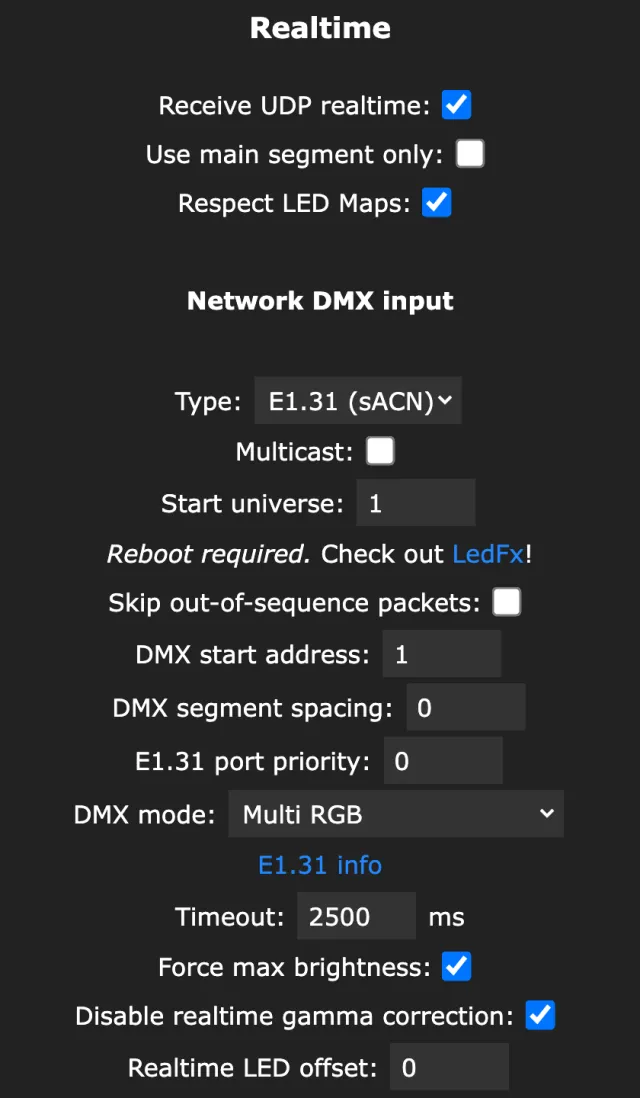
curl -X POST -H "Content-Type: application/json" -d '{"lor":1}' http://192.168.1.57/json/stateTo stop the light listening at all, open Config›Sync Interfaces in the web UI. In the Realtime section, untick Receive UDP realtime. That blocks UDP realtime, Hyperion and TPM2.NET data, but not E1.31, Art-Net or DDP. For E1.31 and Art-Net, set DMX mode to Disabled under Network DMX input. DDP has no off switch, so a DDP sender has to be stopped at the source. The same section holds the realtime Timeout (2500 ms by default), which is how long WLED waits after the last frame before going back to normal.
Take Control in WLED Max
When an outside source is driving the light, the Control tab shows a banner on iOS and Android that says External Control Active with the source and its address, for example “E1.31 (192.168.1.20)”. Your own Light Alerts and Snap a Palette previews never trigger it. Tap Take Control and pick one:
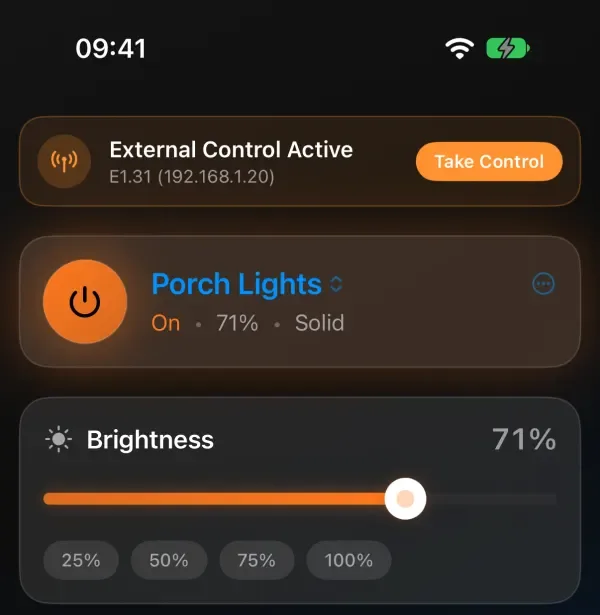
- Override Until Data Stops. The app takes over now, and the override ends by itself when the sender stops. Good for “LedFx is still running in the other room and I just want normal light for a bit.”
- Override Until Reboot. The override holds until the light restarts. Useful when a sender keeps coming back and you don’t feel like tracking it down tonight.
The light behaves exactly as it would if you set the same override from the web UI or the API.
If the sender keeps streaming after you take over, the banner turns into a calm You have control note that names the paused sender, with a Give back control button. Tap it and the sender’s colors show again. When the sender stops, the note goes away by itself.
Hyperion and Ambilight setups
If the strip sits behind a TV running Hyperion or HyperHDR (an Ambilight style backlight), or works as an LedFx visualizer, realtime mode is the point. The TV box or computer is the sender, and WLED only shows what it gets. Two settings make the two worlds get along:
- Timeout. A shorter one (say 1000 ms) gets WLED back to its own effect sooner after the sender stops.
- Use main segment only (in Sync Interfaces). Live data paints only the main segment, and the other segments keep running WLED effects. Handy when only part of a strip is behind the TV.
In WLED Max, the timeout is under Device Settings, Sync Interfaces, in the E1.31 / DMX / Art-Net section, as Timeout (×100ms), so 25 means 2.5 s. The field shows once Enable E1.31/Art-Net is on.
It keeps coming back
Flickers between my effect and some other pattern. Two sources are fighting, or a sender streams so slowly that frames arrive further apart than the timeout. Find it with lip and stop it.
Stuck again after a reboot. The sender never stopped. lor 2 only lasts until a reboot, on purpose. Stop the sender or turn off realtime receiving.
xLights or Falcon Player shows. A sequencer drives WLED the same way. WLED and xLights covers DDP, E1.31 and what happens when the show stops.
live is false and it still ignores me. Then it isn’t realtime mode. Check that you’re changing the selected segments, that a palette isn’t overriding your colors (see WLED colors and the white channel), and that no playlist is switching presets (WLED playlists and Shuffle).
FAQ
How do I get WLED out of realtime mode? Stop the program sending the data, or send {"lor":1} to /json/state. In WLED Max, tap Take Control.
What does “lor” mean in WLED? Live data override. 0 is off, 1 lasts until the live data ends, 2 lasts until a reboot.
Which ports does WLED listen on for realtime data? UDP realtime defaults to port 21324, E1.31 uses 5568, Art-Net 6454 and DDP 4048.